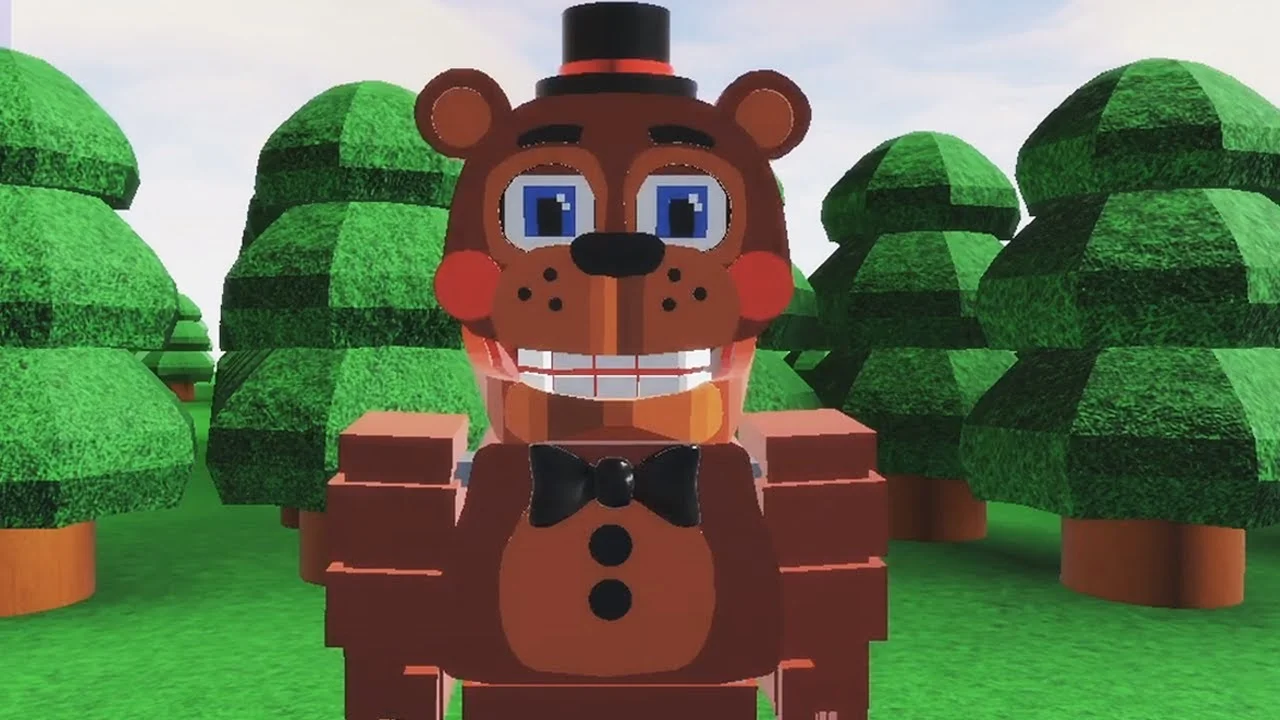
- FNAF World Multiplayer is a fan-made Roblox multiplayer adventure featuring FNaF animatronics, with roughly 5.9M+ visits and an 82.1% user rating.
- Start with a balanced character like Freddy Fazbear to learn movement, attacks, and survival before switching to specialists.
- Play as a coordinated party: assign damage, support, and utility roles before entering difficult areas.
- Watch the experience title: Fnaf World Multiplayer, Return to Animatronics, and Multiplayer-2 are separate Roblox entries.
- No active codes confirmed: no public redeemable code system is currently verified for this experience.
What Is FNAF World Multiplayer?
FNAF World Multiplayer is a fan-made multiplayer experience on Roblox, created by ProtoScrap8790, that reimagines the colorful RPG world of FNaF World as a cooperative adventure. Instead of the solo turn-based structure of the original FNaF World, this experience lets multiple players control familiar animatronics, explore shared maps, and fight enemies together in real time.
It is important to understand what this experience is not. It is not an official standalone release by Scott Cawthon, and it is not the original FNaF World RPG. Third-party Roblox trackers report roughly 5.9M+ total visits and a rating around 82.1%, though these numbers refresh over time. The Roblox page currently lists no active running servers, so availability can vary — check the official Roblox experience page before planning a session.
Video Highlights:
- See how different animatronics handle in the forest area of the experience
- Real-time gameplay of character movement and exploration
- Useful preview of the multiplayer map structure before you join
Multiple similarly named Roblox pages exist, including Fnaf World Multiplayer, FNaF World - Return to Animatronics, and Fnaf-World-Multiplayer-2. These are separate experiences with different maps and progression. Always confirm the exact page link with your group before joining.
The core loop is simple: join a server, pick an animatronic, explore the map with other players, and clear enemy encounters as a team. The sections below walk through character selection, party coordination, and progression goals.
Character Roles and Team Composition
The roster is built around recognizable FNaF animatronics, each filling a distinct slot in a party. Understanding these roles matters more in multiplayer than raw character popularity, because a balanced team clears content far more reliably than a group of overlapping damage dealers.
| Character | Damage | Survivability | Team Role | Best For |
|---|---|---|---|---|
| Freddy Fazbear | Balanced | High | Frontline anchor | New players, stable group fights |
| Foxy | High burst | Moderate | Damage dealer | Aggressive focus-target play |
| Bonnie | Consistent | Moderate to high | Secondary attacker | Predictable, steady damage |
| Chica | Moderate | Moderate | Supportive damage | Learning positioning |
| Toy Freddy | Moderate | Moderate | Balanced backup | Filling an open party slot |
| Mangle | Situational | Lower under pressure | Specialist attacker | Experienced, coordinated players |
Frontline Anchor
- Freddy Fazbear excels here
- Absorbs enemy attention
- Keeps the group's center stable
- Great first pick for beginners
Damage Dealer
- Foxy leads burst pressure
- Bonnie adds consistent output
- Focus priority targets fast
- Needs space from teammates
Support and Utility
- Chica sustains team fights
- Toy Freddy fills flexible slots
- Monitor party health and timing
- Cover interruptions and positioning
For a standard four-player group, aim for one frontline anchor, two attackers, and one flexible support or utility slot. If your party keeps failing an encounter, swap a duplicate damage role for a support-oriented character before changing strategy.
Step-by-Step: From Joining to Your First Party Clear
Follow this route to go from a fresh join to a coordinated first clear without requiring advanced knowledge of the roster.
Join the Correct Experience
Open the intended Roblox experience page and compare its title with your group's choice. Let one player act as host and share the exact page link so everyone lands on the same version.
Choose a Starter Character
Pick a balanced animatronic such as Freddy Fazbear or Chica. Learn the basic attack pattern, movement speed, and health display before committing to a specialist like Mangle.
Explore the Starting Area
Move through accessible paths and note enemy locations, interactable objects, and routes toward new areas. Avoid unnecessary fights until the controls feel comfortable.
Practice Combat Deliberately
Engage enemies one encounter at a time. Watch each enemy's opening actions before committing your strongest attacks, and keep short attack cycles so you can react to target changes.
Coordinate with Your Party
Stay near teammates, focus the same enemy, and let players with stronger offense or defense handle their preferred roles. Regroup after every fight before advancing.
You are ready for high-difficulty areas when you can complete early encounters without emergency help, your party has defined roles, and everyone joins the same server on the first try.
Boss Encounters and High-Difficulty Areas
Major encounters in FNAF World Multiplayer reward pattern recognition over raw damage output. Rushing an unfamiliar boss with every ability at once usually ends in a wipe; a patient team that reads the enemy first clears faster overall.
| Tactic | What to Do | Why It Works |
|---|---|---|
| Read the opening | Watch the enemy's first actions before committing attacks | Reveals patterns and target priorities |
| Stagger abilities | Do not overlap every high-value attack | Maintains pressure across the whole fight |
| Keep a responder | Hold one player ready for surprises | Covers unexpected target switches |
| Prioritize threats | Kill interrupt-heavy enemies first | Protects healing and movement |
| Reset and adjust | Return to a safe area, change roles or timing | Breaks repeated-failure loops |
Fast-clear team roles break down into three responsibilities:
- Primary damage: maintains pressure during safe attack windows identified after reading the boss's pattern
- Support: monitors party health, recovery timing, and defensive responses
- Control/utility: handles additional enemies, interruptions, and positioning demands
Before a boss, avoid spending essential abilities on minor enemies along the route. Move through dangerous sections together, use safe areas to reorganize, and confirm who handles each objective before pushing forward.
Splitting across separate areas before a boss is the most common cause of failed runs. If players end up in different sections, fall back to the last safe area and re-form before attempting the encounter.
Unlock Goals and Progression Checklist
Unlockable content in this experience falls into clear categories. Plan collection sessions by grouping objectives so one trip can complete multiple nearby goals instead of searching for every reward separately.
| Category | Unlock Requirement | Recommended Route | Difficulty |
|---|---|---|---|
| Characters | Complete the character-specific objective in the experience | Progress main areas first, return for objectives | Medium |
| Areas | Reach the progression point that opens the next section | Follow the primary route with the full party | Medium |
| Badges | Finish the badge objective tied to an area or milestone | Group badge attempts by location | Varies |
| Items | Find through exploration, progression, or encounter rewards | Search side paths after securing the main route | Easy to Hard |
Early Progression Milestones:
- Join the correct experience page with your full party
- Learn one balanced character's attacks and movement
- Complete your first coordinated group encounter
- Assign damage, support, and utility roles before a boss
- Record blocked paths and revisit them after main objectives
- Confirm the exact experience title before every session
No active redeemable codes are currently confirmed for FNAF World Multiplayer. Treat any code list circulating online as unverified, and rely on the Roblox experience page and community channels such as the FNaF Discord for future announcements.
Multiplayer Troubleshooting and FAQ
Server and entry problems almost always come down to one cause: players joining different experience entries or separate server instances. Work through the fixes below in order.
| Problem | Likely Cause | Fix |
|---|---|---|
| Friend not in your game | Different experience entry | Compare exact page titles, rejoin via host link |
| Players in separate servers | Roblox placed you in different instances | Leave and rejoin through the host's session |
| Server not appearing | Page load or join flow issue | Restart the Roblox join flow and retry |
| Page shows no active servers | Experience temporarily offline | Check the Roblox page or community channels later |
Have one player own the session: they share the exact experience link, confirm every member has loaded, and call the route before the group leaves the starting area.
Q: Is FNAF World Multiplayer an official Scott Cawthon game?
No. FNAF World Multiplayer is a fan-made Roblox experience created by ProtoScrap8790, inspired by the FNaF universe. It is separate from the official FNaF World RPG.
Q: Which character should a new player pick first?
Freddy Fazbear or Chica. Both offer balanced, forgiving playstyles that let you learn movement, attack timing, and group positioning without the fragility of a specialist like Mangle.
Q: Are there active codes for FNAF World Multiplayer?
No public redeemable code system is currently verified for this experience. Any code lists circulating online should be treated as unverified until confirmed on the official Roblox page or community channels.
Q: Why can't my friend join my game?
Most often you are on different experience entries or separate servers. Compare the exact Roblox page title, then have your friend rejoin through the host's session or the shared experience link.