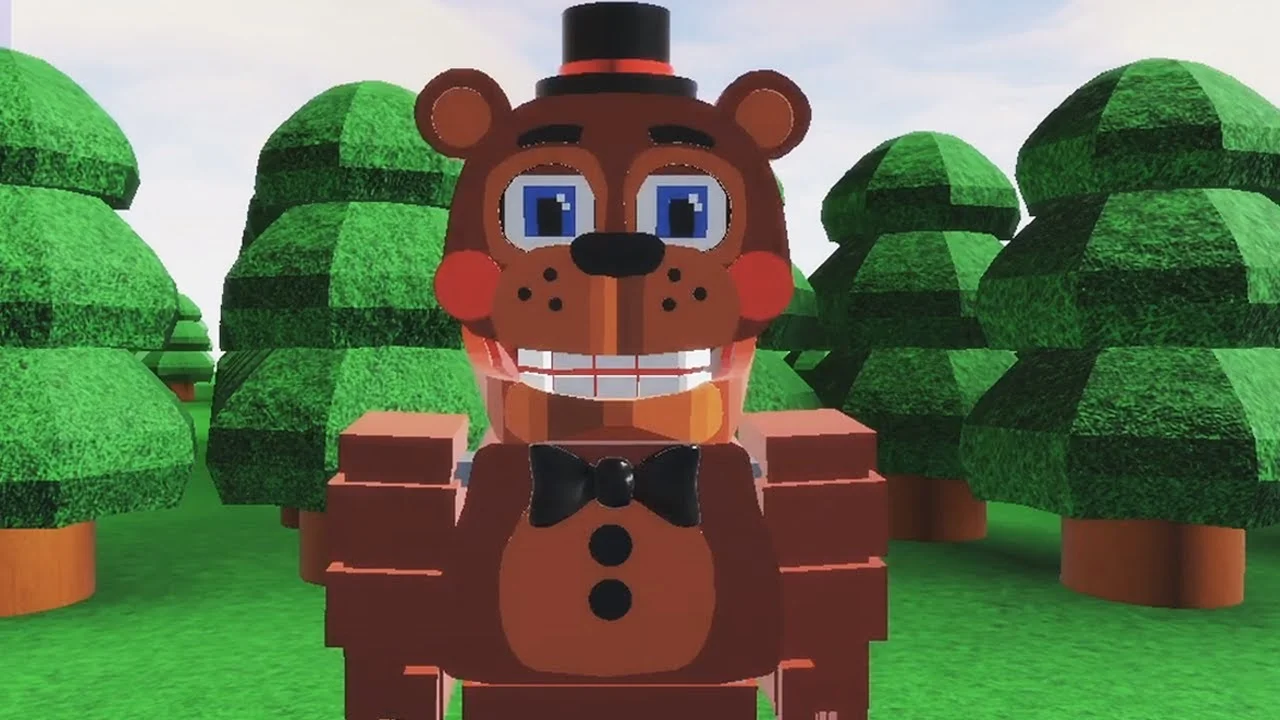
- FNAF World Multiplayer is a fan-made Roblox experience playable on mobile through the Roblox app
- Mobile setup: Install Roblox, search the exact experience title, and join the same server as friends
- Touch controls: A virtual joystick handles movement while on-screen buttons manage attacks
- Multiple entries exist: Fnaf World Multiplayer, Return to Animatronics, and Multiplayer-2 are separate pages
- No active codes confirmed: No public code system has been verified for this experience
What Is FNAF World Multiplayer on Mobile?
FNAF World Multiplayer is a fan-made Roblox multiplayer adventure built around familiar Five Nights at Freddy's animatronics. It is not an official standalone release by Scott Cawthon. The primary experience page was created by Roblox user ProtoScrap8790, and third-party trackers have recorded roughly 5.9M+ visits with a rating around 82.1%, though these figures can change as the platform refreshes.
Because the experience runs on Roblox, it is fully playable on mobile devices through the official Roblox app on Android and iOS. There is no separate app store download, no standalone price, and no PC required — everything happens inside the Roblox platform.
Video Highlights:
- Watch how players control different animatronics while exploring the forest area
- Demonstrates character selection and basic movement in the experience
- Useful visual reference for what mobile players can expect on a smaller screen
Core Experience Overview
| Detail | Information |
|---|---|
| Platform | Roblox (PC, mobile, tablet) |
| Creator | ProtoScrap8790 |
| Genre | Fan-made multiplayer adventure |
| Total Visits | 5.9M+ (third-party tracking) |
| User Rating | 82.1% (approximate) |
| Current Server Status | Roblox page shows no active running experience at times |
Roblox hosts several similarly named experiences, including Fnaf World Multiplayer, FNaF World - Return to Animatronics, and Fnaf World Multiplayer 2. Always confirm the exact title before joining so your party lands in the same version.
Mobile Setup: How to Start Playing
Playing FNAF World Multiplayer on a phone follows the same flow as any Roblox experience. The steps below cover the full path from installation to your first session.
Install the Roblox App
Download the official Roblox app from the Google Play Store or Apple App Store and log in with a free Roblox account.
Search the Exact Experience Title
In the app search bar, type the full experience name and compare results carefully to avoid landing on a different fan version.
Open the Experience Page
Tap the correct result and review the creator name and description to confirm you found the intended entry.
Join the Game
Tap the Play button and wait for the map to fully load before moving, since mobile loading can take a few extra seconds.
Choose Your Animatronic
Select an available character from the menu. Balanced characters like Freddy Fazbear work well while learning touch controls.
Mobile vs Desktop Comparison
| Aspect | Mobile | Desktop |
|---|---|---|
| Controls | Virtual joystick + touch buttons | Keyboard + mouse |
| Movement precision | Moderate | High |
| Combat timing | Slightly slower reactions | Faster input |
| Party chat | On-screen keyboard | Faster typing |
| Best for | Casual exploration | Boss fights and coordination |
Close background apps and lower Roblox graphics settings in the app menu if the experience stutters. Mobile devices handle detailed maps better with fewer active processes.
Playing With Friends on Mobile
Multiplayer is the heart of this experience. Because several similarly named pages exist, coordinating a group requires extra care on mobile, where it is easy to tap the wrong search result.
Confirm the Entry
- Share the exact link with your party
- Compare creator names
- Avoid similar-looking titles
Join the Same Server
- One player acts as host
- Others join through the host's session
- Rejoin if placed in a different server
Coordinate Roles
- Assign damage, support, and utility
- Wait for all players to load
- Regroup after each fight
Recommended Team Roles
| Role | Responsibility | Suggested Characters |
|---|---|---|
| Frontline anchor | Absorb pressure, hold position | Freddy Fazbear |
| Damage dealer | Focus priority enemies | Foxy |
| Secondary attacker | Steady offense | Bonnie |
| Supportive damage | Sustain and positioning | Chica |
| Flexible backup | Fill missing role | Toy Freddy |
Mobile players type slower than desktop users. Agree on a route and simple callouts before entering difficult areas so the party does not need long mid-fight messages.
Mobile Gameplay Goals and Checklist
Once you are in the experience, work through objectives in a stable order. Mobile players benefit most from a patient route that avoids unnecessary fights early on.
First Session Goals:
- Join the correct experience and load into the starting area
- Select a balanced animatronic and learn its basic attack
- Explore the starting area without engaging strong enemies
- Complete early combat encounters while monitoring health
- Join or form a party and clear one area as a group
Unlock Categories Overview
| Category | Requirement | Difficulty |
|---|---|---|
| Characters | Complete character-specific objectives in the experience | Medium |
| Areas | Reach progression points that open new sections | Medium |
| Badges | Finish badge objectives tied to milestones | Varies |
| Items | Explore side paths and complete collection goals | Easy to Hard |
Advance through main areas first, then return to earlier sections for character objectives and repeatable collection tasks. This route reduces backtracking on slower mobile connections.
Troubleshooting and Codes Status
No active redeemable code has been confirmed for FNAF World Multiplayer. Treat any circulating "code list" with caution, and rely on the official Roblox experience page and community channels for genuine announcements.
Common Mobile Issues and Fixes
| Problem | Likely Cause | Fix |
|---|---|---|
| Cannot find the experience | Similar titles confuse search | Use the exact page link from the host |
| Placed in a different server | Roblox auto-matching | Leave and rejoin through the host |
| Game will not load | Weak connection or device load | Restart the app, lower graphics, retry |
| Friends in another version | Wrong experience entry selected | Verify exact title and creator, rejoin |
| Stutter during combat | Background apps, low memory | Close apps, reduce graphics settings |
For community discussion and updates, the FNaF Discord and r/fivenightsatfreddys cover fan projects and Roblox FNaF experiences. Always verify server status directly on the Roblox experience page, since fan experiences can go offline or be updated without notice.
Roblox page descriptions for this experience indicate it "may be updated again," so check the page periodically for map changes, new characters, or renewed server availability.
FAQ
Q: Is FNAF World Multiplayer available as a standalone mobile app?
No. FNAF World Multiplayer is a fan-made Roblox experience, not an official standalone release. You play it on mobile through the free Roblox app on Android or iOS by searching for the experience inside Roblox.
Q: Is FNAF World Multiplayer an official Scott Cawthon game?
No. It is a community-created Roblox experience. The primary page was created by user ProtoScrap8790 and should be treated as a fan project rather than an official FNaF series release.
Q: Are there active codes for FNAF World Multiplayer?
No active redeemable code has been confirmed for this experience. There is no verified evidence of a code system, so avoid unverified code lists and check the Roblox experience page and community channels for real announcements.
Q: Why can't my friends and I get into the same game?
Multiple similarly named Roblox experiences exist, including Return to Animatronics and Multiplayer 2. Confirm the exact page title and creator, then have one player host and share the direct link so everyone joins the same server.