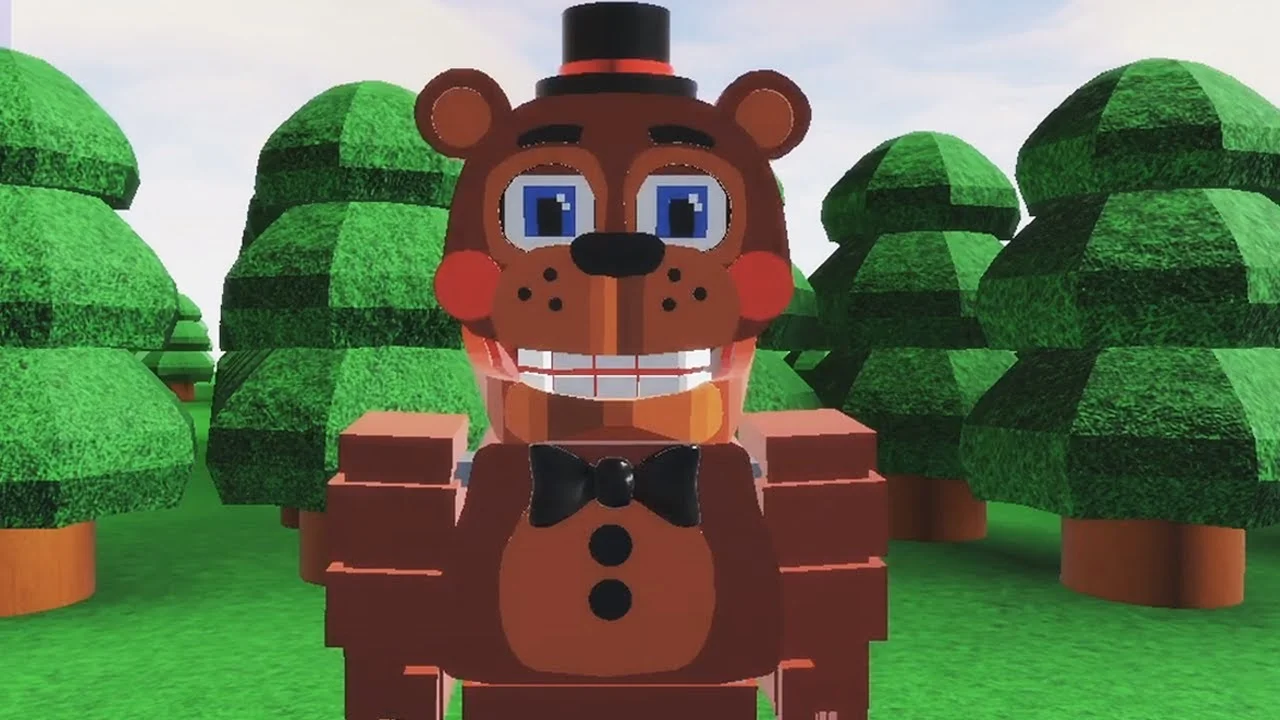
- FNAF World Multiplayer is a fan-made Roblox multiplayer adventure featuring FNaF animatronics, created by ProtoScrap8790.
- Pick Freddy Fazbear first: his balanced kit is the most reliable starting choice for new players.
- Play as a party: coordinated teams clear encounters faster than players splitting across the map.
- Verify the experience entry: similarly named Roblox pages (Return to Animatronics, Multiplayer 2) are separate games.
- No active codes confirmed: no public code system has been verified for this experience.
What Is FNAF World Multiplayer?
FNAF World Multiplayer is a fan-made multiplayer experience on Roblox that lets players control recognizable Five Nights at Freddy's animatronics in a colorful exploration-and-combat world. It is not an official Scott Cawthon release. The main experience page is hosted on Roblox, with a third-party reported figure of roughly 5.9M+ visits and an 82.1% user rating, though these numbers may shift as the platform refreshes data.
Video Highlights:
- See how each animatronic handles in the starting forest area
- Real gameplay of character switching and exploration movement
- Useful visual reference before choosing your first character
| Experience Fact | Detail |
|---|---|
| Platform | Roblox |
| Creator | ProtoScrap8790 |
| Type | Fan-made multiplayer adventure |
| Reported visits | 5.9M+ (third-party data) |
| Reported rating | 82.1% |
| Active servers | Check the Roblox page for current status |
The Roblox page has previously shown no active running experience. Before planning a session with friends, open the game page and confirm that servers are live so nobody wastes time on a dead entry.
Character Tier Rankings
The roster is built around classic FNaF animatronics. Rankings below emphasize practical multiplayer value — consistent damage, survivability, and how well each character supports a balanced party — rather than popularity alone.
| Tier | Character | Damage | Survivability | Team Role | Best For |
|---|---|---|---|---|---|
| S | Freddy Fazbear | Balanced | High | Frontline anchor | Learning encounters, stable group fights |
| A | Foxy | High burst | Moderate | Damage dealer | Aggressive movement, focusing targets |
| A | Bonnie | Consistent | Moderate–High | Secondary attacker | Predictable, steady offense |
| B | Chica | Moderate | Moderate | Supportive damage | Learning positioning |
| B | Toy Freddy | Moderate | Moderate | Balanced backup | Filling an open party slot |
| C | Mangle | Situational | Lower under pressure | Specialist attacker | Experienced players with good positioning |
Freddy Fazbear — S Tier
- Balanced attacks, dependable frontline
- Easiest character for new players
- Works in solo and group play
Foxy — A Tier
- High burst potential
- Needs teammates to create space
- Best for aggressive players
Mangle — C Tier
- Positioning-dependent specialist
- Strong with a frontline partner
- Not recommended for beginners
Tier lists are a starting point, not a rule. If your party already has a frontline anchor like Freddy, adding Foxy or Bonnie for offense creates a more effective composition than stacking two anchors.
Step-by-Step Beginner Route
New players should follow a clear routine from first load-in to coordinated group play. This route assumes no prior knowledge of the roster or map.
Join the experience
Open the correct Roblox experience page and let the game finish loading before moving. Confirm your character model, controls, health display, and party interface are all visible.
Choose a character
Select a balanced animatronic such as Freddy Fazbear to learn movement, attack timing, and survival before trying specialists like Mangle.
Explore the starting area
Move through accessible paths and note enemies, interactable objects, and routes toward new areas. Avoid unnecessary fights until the controls feel natural.
Practice combat
Engage nearby enemies one encounter at a time. Watch attack timing, ability ranges, and your health bar during every fight.
Coordinate with other players
Stay near teammates, focus the same enemy, and let stronger offensive or defensive characters handle their preferred roles.
Finish your first session having completed several early encounters with one character. Mastering one animatronic beats sampling all six with no depth.
Boss Fights and Unlock Tracking
Major encounters reward pattern-reading over damage races. Watch the enemy's opening actions before committing your strongest attacks, stagger high-value abilities instead of overlapping them, and always keep one player ready to respond to unexpected moves.
| Boss Team Role | Responsibility |
|---|---|
| Primary damage | Maintain pressure during safe attack windows |
| Support | Monitor party health and recovery timing |
| Control / utility | Handle extra enemies, interruptions, positioning |
| Reserve | Respond to surprises instead of stacking abilities |
For unlockables, plan collection sessions by category instead of chasing rewards one at a time:
| Unlock Category | Requirement | Recommended Route | Difficulty |
|---|---|---|---|
| Characters | Complete the character-specific objective in the experience | Push main areas first, return later | Medium |
| Areas | Reach the progression point that opens the next section | Move as a party, note blocked paths | Medium |
| Badges | Finish the badge objective attached to each milestone | Group attempts by location | Varies |
| Items | Find through exploration or encounter rewards | Search side paths after the main route | Easy–Hard |
Fnaf World Multiplayer, FNaF World - Return to Animatronics, and Fnaf-World-Multiplayer-2 are separate Roblox entries. Unlock progress and maps do not transfer between them, so verify the exact title before starting a long objective.
Beginner Milestones:
- Join the correct Roblox experience page
- Master one balanced character's attack pattern
- Complete three early combat encounters
- Explore the starting area's side paths
- Finish one group encounter with teammates
Multiplayer Setup and FAQ
Organizing a session is straightforward once everyone uses the same entry point. One player should act as host, share the exact experience page, and confirm all party members load into the same server before entering difficult areas. If players land in different instances, leave and rejoin through the host.
| Setup Step | Action |
|---|---|
| Confirm entry | Compare experience titles with the whole group |
| Enter server | Join through the host or shared page |
| Form the team | Invite friends, assign damage/support roles |
| Coordinate | Use one navigator, call out routes and threats |
| Troubleshoot | Verify page title, rejoin, restart the join flow |
For broader discussion, the FNaF Discord and r/fivenightsatfreddys cover FNaF fan projects and Roblox FNaF games. Note that these are community spaces, not official channels for this specific experience.
Q: Is FNAF World Multiplayer an official Scott Cawthon game?
No. It is a fan-made Roblox multiplayer experience created by ProtoScrap8790. It is separate from the officially released FNaF World RPG.
Q: Are there active codes for FNAF World Multiplayer?
No public code system has been confirmed for this experience. Be cautious of sites listing codes, as fabricated codes will not redeem. Watch the Roblox game page for any future code announcements.
Q: Which character should a new player choose?
Freddy Fazbear is the most reliable starting pick thanks to his balanced attacks and high survivability. Chica is another forgiving option for learning group positioning.
Q: Why can't my friend join the same game?
Check that both of you opened the same Roblox experience entry. Similarly named pages like FNaF World - Return to Animatronics and Fnaf-World-Multiplayer-2 are separate games with independent servers. Rejoin through the host's page if needed.