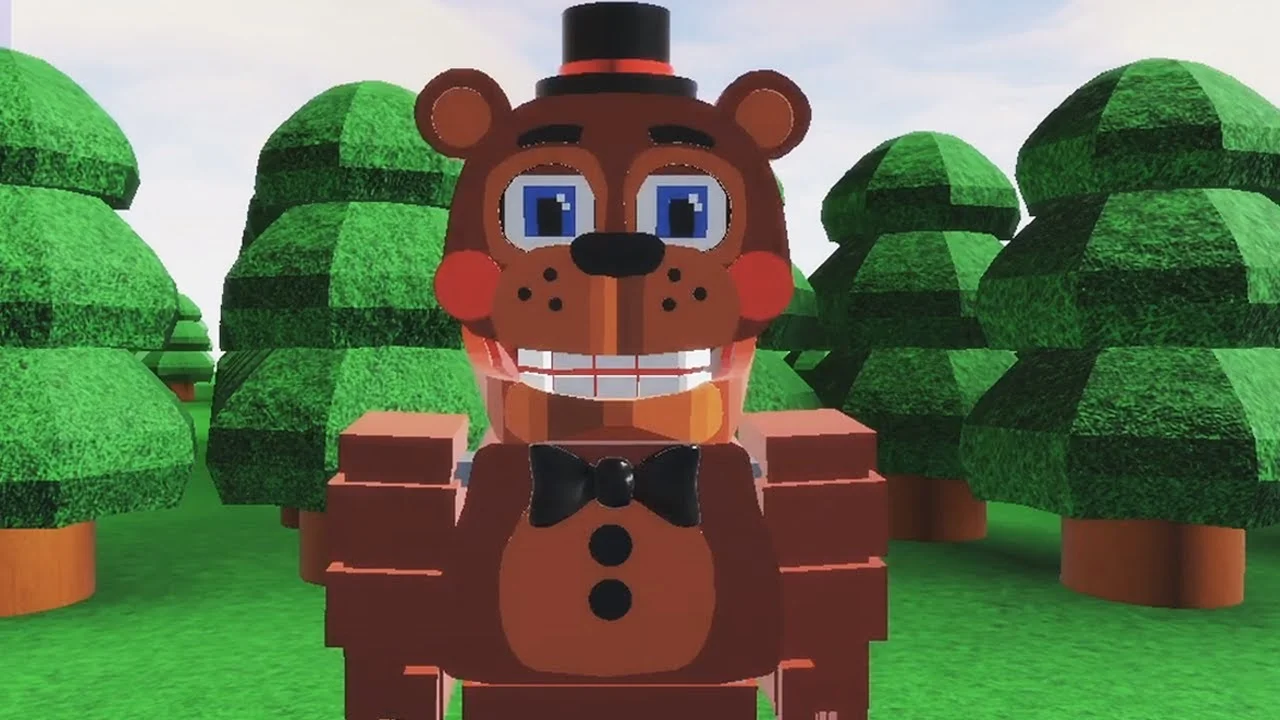
- FNAF World Multiplayer is a fan-made Roblox experience by ProtoScrap8790, not an official Scott Cawthon release.
- Confirm the exact experience page before inviting friends, because similarly titled Roblox entries exist as separate games.
- Pick a balanced animatronic first, such as Freddy Fazbear, to learn movement, attacks, and survival.
- Coordinate with your party by assigning damage, support, and utility roles before difficult encounters.
- No active codes are confirmed for this experience, so avoid third-party "code" claims.
What FNAF World Multiplayer Is and How to Start
FNAF World Multiplayer is a fan-made Roblox multiplayer adventure that reimagines the colorful RPG world of FNaF World with playable animatronics, open exploration, and cooperative combat. The main experience page is hosted on Roblox and was created by ProtoScrap8790. Third-party stats report roughly 5.9M+ visits and an 82.1% user rating, though the Roblox page currently indicates no active running servers, so availability can change at any time.
Because the game draws directly from the FNaF World formula, expect bright fantasy environments, familiar animatronic characters, light combat encounters, and exploration-driven progression rather than the survival-horror loop of the mainline Five Nights at Freddy's series.
Video Highlights:
- See how different animatronics handle in the Roblox version of FNAF World
- Tour of the forest area and early exploration routes
- Character movement and attack demonstrations in a live session
The Roblox page for Fnaf World Multiplayer has displayed a "no running experience" notice. If you cannot join, verify the experience page status before troubleshooting your connection, and consider community alternatives while the creator decides on future updates.
| Topic | Detail | Notes |
|---|---|---|
| Platform | Roblox | Free to join with a Roblox account |
| Creator | ProtoScrap8790 | Fan-made project, not official |
| Visits | 5.9M+ | Third-party stat, subject to change |
| Rating | 82.1% | Third-party stat, subject to change |
| Server status | Check the game page | May show no active servers |
Joining the Right Experience and Building a Party
One of the most common mistakes new players make is joining the wrong Roblox page. The name "FNAF World Multiplayer" appears across several distinct entries, and they do not share maps, progression, or servers.
| Experience Entry | What It Is | When to Use It |
|---|---|---|
| Fnaf World Multiplayer | The primary multiplayer entry | Default choice for the classic experience |
| FNaF World - Return to Animatronics | Separate fan experience | Only when your group specifically chooses it |
| Fnaf-World-Multiplayer-2 | Numbered sequel entry | Treat as an independent game |
Confirm the Experience Entry
Open the intended Roblox page and compare its exact title with what the rest of your group selected. Similarly named pages are separate games with different content.
Enter the Same Server
Launch the selected experience and verify everyone landed in the same server. If players appear in different instances, leave and rejoin through the host or shared page.
Invite Friends and Form the Team
Use Roblox's social and joining tools to gather the party before exploring. Agree on the route and assign combat roles up front.
Coordinate Exploration and Combat
Let one player lead navigation while others follow. Call out blocked routes, enemies, and recovery points so the group stays together.
Fix Common Entry Problems
If someone cannot join, first confirm they are using the identical experience page, then restart the Roblox join flow. Only switch to another entry if the whole group agrees.
Designate one player as the host who shares the exact experience link. This prevents the most frequent multiplayer issue: half the party loading into a different, similarly named game.
Choosing Your First Animatronic
Your character choice shapes how you learn the game. Balanced animatronics forgive mistakes, while aggressive specialists demand better positioning and team support.
Freddy Fazbear - Frontline Anchor
- Balanced damage and high survivability
- Dependable all-rounder for learning encounters
- Best first pick for new players
Foxy - Damage Dealer
- High burst potential against priority targets
- Moderate survivability, needs space
- Suits aggressive, mobile playstyles
Bonnie - Secondary Attacker
- Consistent offense with a balanced profile
- Predictable damage routine
- Easier to manage than a specialist
| Character | Team Role | Damage | Survivability | Best For |
|---|---|---|---|---|
| Freddy Fazbear | Frontline anchor | Balanced | High | First-time players, solo exploration |
| Foxy | Damage dealer | High burst | Moderate | Aggressive focus-target play |
| Bonnie | Secondary attacker | Consistent | Moderate-High | Steady, predictable offense |
| Chica | Supportive damage | Moderate | Moderate | Learning team positioning |
| Toy Freddy | Balanced backup | Moderate | Moderate | Filling an open party slot |
| Mangle | Specialist attacker | Situational | Lower | Experienced, coordinated players |
Start with Freddy Fazbear or Chica. Their forgiving profiles let you learn enemy patterns, attack timing, and safe movement before committing to fragile specialists like Mangle.
Combat and Exploration Basics
Combat in FNAF World Multiplayer rewards pattern reading over raw damage racing. Treat every major encounter as a learning fight: observe the enemy's opening actions, then commit your strongest attacks during safe windows.
| Combat Principle | How to Apply It |
|---|---|
| Read before committing | Watch the enemy's first actions before using high-value abilities |
| Stagger attacks | Do not overlap every strong ability; keep pressure spread across the fight |
| Assign roles | One damage player, one support, one utility or control player |
| Keep a responder | Leave one player ready to react to unexpected attacks |
| Regroup after fights | Restore resources and confirm the next objective before moving on |
For exploration, move through accessible paths, note blocked routes for later, and avoid unnecessary fights until the controls feel comfortable. High-difficulty areas are cleared fastest by reducing minor encounters, preserving abilities before bosses, and reorganizing in safe zones.
Players who wander into separate areas without a recovery plan are the most common cause of failed group runs. Stay together through dangerous sections and regroup after each encounter.
Beginner Milestones Checklist
Track your first sessions with these core goals. Each milestone builds toward comfortable cooperative play.
First Session Goals:
- Join the correct Fnaf World Multiplayer Roblox page
- Load in and confirm controls, health display, and party interface
- Select a balanced animatronic such as Freddy Fazbear
- Complete early exploration of the starting area
- Win at least one combat encounter while monitoring health
- Coordinate one group objective with teammates
No active code system has been confirmed for this experience. Treat any third-party "FNAF World Multiplayer codes" page with caution, and rely on the Roblox game page and FNaF community channels for official news.
FAQ
Q: Is FNAF World Multiplayer an official Scott Cawthon game?
No. It is a fan-made Roblox experience created by ProtoScrap8790, inspired by the official FNaF World RPG. The original FNaF World and its trailer are separate official products.
Q: Why can't my friends and I get into the same game?
The name appears on multiple separate Roblox pages, including Fnaf World Multiplayer, FNaF World - Return to Animatronics, and Fnaf-World-Multiplayer-2. Confirm everyone is using the identical experience link, then rejoin through one designated host.
Q: What is the best character for learning how to play FNAF World Multiplayer?
Freddy Fazbear is the most dependable starting choice thanks to balanced damage and high survivability. Chica is another forgiving option for learning group positioning.
Q: Are there active codes for FNAF World Multiplayer?
No publicly confirmed code system exists for this experience. Avoid sites claiming active codes, and check the Roblox game page or FNaF community servers such as the FNaF Discord for legitimate updates.